


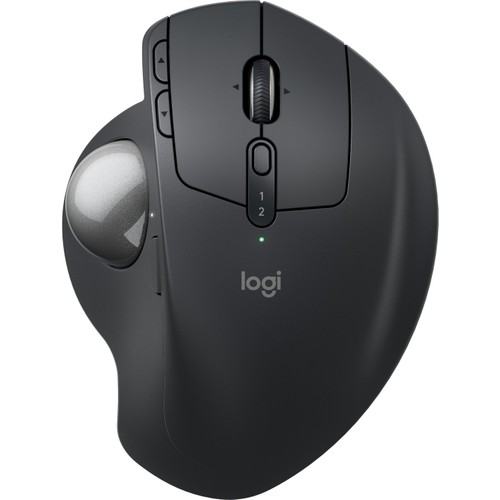
Logitech MX Ergo S Advanced Wireless Trackball Mouse
86%


Sentiment Breakdown (283)
This Product Is Best For
Positive Highlights (86%)
Ürün mükemmel. Malzeme kalitesi ergonomi ve sabit kullanım sağlaması çok güzel. 8-9 saatlik minimum günlük kullanımda bilekleriniz ağrımadan işinizi bitirebilmeniz ise tarifsiz bence. Yıllarca gerçekten eziyet çekmişim kendi adıma.
For the first week or two I thought I'd be returning this mouse. It took time to get used to the trackball and I would get cramps and fatigue in my thumb from the scrolling of the trackball. Once used to it, this is so much better than a traditional mouse that requires moving your wrist or arm and occasionally lifting to reach far away areas of the screen. It's actually enjoyable to use and super comfortable.
I love the mouse for the ergonomics. It feels great. The soft mouse clicks are really nice. The only thing that would make it better is having hyper scroll. I'm coming from an MX Master 2 that I have loved for years. I need something more ergonomic, and it's a shame that there isn't an ergonomic offering with hyper scroll
The Logitech MX Ergo is a fantastic mouse! It's incredibly comfortable to use and feels great to rest my palm on when in use. Once you've set up some shortcuts for the keys then it really does help make your workflow easier. I set keys for video-call and mute when using Teams and zooming in and out when using Photoshop, so the cross-platform functionality is amazing! If you are looking for a sign to get this mouse, here it is!
Delighted with the trackball. Needed it for precision work and it is perfect. It is rather expensive, but I really think it is worth it. The rubberised coating feels very good. It has two precision modes, but I find that the 'faster' one suffices for all my work. I also keep it tilted at 20 degrees, finding that my hand/wrist/arm feel very comfortable and I can work for much longer than with other trackballs/mice I have tried.
I just got the Logitech MX Ergo S Plus, and it's already making a big difference. The trackball design means I don't have to move my whole arm around, which really helps reduce wrist and forearm strain, great for avoiding carpal tunnel issues. It feels solid, the tilt adjustment makes it easy to find a comfortable angle, and the battery life is excellent. My only note is that it's a bit heavier than a regular mouse, but the comfort and precision make it worth it.
Great product, the tilt makes it easy on the wrist, rechargeable and very well made
There are three angle options with this device - flat on the desk, a slight angle and a sharper angle. I don't know what degree the angles are at - I just know that this thing has saved me from continued wrist pain in just two weeks. The ability to switch things up on the fly is perfect for reducing RSD pain. I have been unable to get the software installed on my work laptop, due to red tape so I cannot speak to the customization abilities, but it works great as is.
I have tried different type ergonomic mouses similar to this mouse functionalities, I think at least 35% better than other similar mouses in comparison, but of course about the same percentage higher price, for me it worth it every penny. 4 different angels, dual device option, slow cursor move button, very quiet clicks, modifiable buttons. If the price tag doesn't bother you, you are going to love it.
I've used plenty of trackball mice, of pretty much every description. This is the nicest, the finest, the most pleasant to use that I've encountered yet. Very much worth the money if you spend a lot of time mouse in hand. The mass of it is extra satisfying, and the included wedge to increase the angle from horizontal is a major bonus from a comfortability standpoint. I'm deeply satisfied with this purchase.
Negative Highlights (8%)
Henüz bir haftadır kullanıyorum. İlk kez bu tip bir cihaz kullanıyorum o yüzden şu anda oldukça konforlu geldi. Malzeme kalitesi biraz kötü gibi ileride sorun yaratmaz umarım. Ayrıca topunu her gün çıkarıp temizlemek gerekmekte çünkü dönmüyor bazen aksi halde. Fiyatını göz önüne alınca değmeyeceğini düşünüyorum. İndirimlerde değerlendirilebilir
This is definitely a good mouse when you don't have a lot of desk space. I often have to use my computer in limited space conditions and not needing to move my mouse around has been great. My one gripe is that the ball seems to get gunked up as needs to be spun fast to loosen it up at least once a day.
Got this to try out in place of my MX3s. Sometimes I don't want to have to move my arm and this has been very comfortable to use. I actually use this more than my mouse now. If you are thinking about it I would say go for it. Give it a couple weeks and then clean out around the ball and it will move very smooth.
Backing plate missing so can't use mouse without beibg wobbly. trackball sticks and dosent work
I am not used to a stationary mouse, and at times, I find this thing frustrating. It does help with the pain in my hand at the end of my work day, but I find there are times when the roller ball is sluggish and slow. I do like that it is rechargeable and it does reduce my hand pain which os why I chose it.
I have a normal mouse for gaming and I only use this one while working. It is really good since it allows you to rest the wrist. The battery lasts forever and the dual connection between Bluetooth and the wireless connection is really handy. You have to slap the ball every now and then to get the dust off it which is a common issue with these ball models. Apart from it, is perfect.
i HAVE USED A m575 for years, they are great when they work but have no longevity, so I switched to this one, It is worse right out of the box! The ball stalls & sticks, theren is no dirt in the pins. So I iam taking this baxk and looking for something else from a different company
It has amazing design and very comfortable. I really wanted to keep using it but after a week or so or usage it started to clog and pointer was non responsive to unusable level. After clean up (you can pop ball out with a pen) it work well for 10 mins and then break again. I think it has something to do with ball reflective coating, with time it become soiled with your finger fat and don't reflect as expected, but it's only my guess. Returned back for store and bought their mouse instead.
It's reliable and battery sometimes last a few weeks and this is for someone who games 3-4hours each day. The pairing process was easy using the dongle and even with Bluetooth it wasn't difficult. The only problem I have with this mouse is that quite often dust accumulates under the mouse ball making scroll a little stuck.
Critical Issues (5)
Available on
Check out the latest prices and listings across some trusted platforms.
Logitech MX Ergo S Advanced Wireless Trackball Mouse
Logitech MX Ergo S Advanced Wireless Trackball Mouse
Logitech MX Ergo S Advanced Wireless Trackball Mouse
Logitech MX Ergo S Advanced Wireless Trackball Mouse
Logitech MX Ergo S Advanced Wireless Trackball Mouse
Logitech MX Ergo S Advanced Wireless Trackball Mouse
YouTube Video Insights
Analysis of expert reviews and user feedback from YouTube
Positive Mentions
you can either have it at this slightly elevated angle or you can press down and it puts it at a more flat angle so it's really nice they gave you two different hand positions so you can adjust it depending on how your wrist is feeling
it's still really comfortable to use and it's very low fatigue on your wrist in your hand because you move it so little using the mouse
Negative Mentions
I do wish they had a newer version of this mouse with USBC but with 120-day battery life you're really not going to be charging it that much anyway so it's just a minor inconvenience
first I think they need a new USBC version of the mouse because pretty much everything uses USBC these days